

Kia ora {{ First name | friend }},
We’re exploring the light and shadow of technology, with a focus on efficient AI workflows to free up your time.
This week’s edition features:
A couple Custom GPT’s which I use regularly for workflow efficiency
A lot of China updates
Google taking AI to space
Black Mirror robot firefighter dogs
Thanks for being here.
Featured Workflow: Use Terminal on Mac with ChatGPT for workflow efficiency
Ok so I’ve been nerding out on workflow efficiency, and seeing how “local” i can make process (i.e not having to navigate to some weird website to do things fast).
I spend a lot of time downloading music and videos for my work, from Youtube, etc. So I created a customGPT with some instructions to allow me to do this directly from my desktop, rather than going to “youtubetomp4.com” or whatever and getting bombarded by ads.
Note: this workflow is specifically for rapid download of music and video content into one of three formats: .mp4 for video, .wav for audio, or .gif for GIFs.
Here’s how it works
Find the link for the Youtube video you want downloaded, or the file on your desktop.
Open a chat with this GPT and paste the link, or the file location, with what you want in one line, including the keyword: “gif”, “mp4”, or “wav”,
If using a Youtube link, paste like this “{link} mp4”
If using a file on your desktop, say “covert dogs.mov file on desktop to gif”
If it’s a GIF, mention size and (optionally) duration; it defaults to looping and trims to 8 seconds for small, smooth results.
Send the message; the GPT replies with a ready-to-paste Terminal command.
Copy the Terminal command, open Terminal on Mac, paste the command.
Terminal will do it’s code thing.
Collect the file where the command creates it (e.g., Downloads, Desktop etc).
Woohoo! You’ve saved yourself time and mental capacity.
Here’s a screen recording of me using the above GPT to download the Robot Firefighter Dog video for this newsletter (see below). GIF-ception.
It might look complex, but I literally wrote 7 words, then copy/pasted the command, and the video was good to go. (I had already screen-recorded the video of dogs and had it ready in “documents” folder).

Important note: For this to work, you’ll need to install a few packages (functions) in Terminal first. You can simply paste the below line into terminal and it will put in the necessary packages. It’s totally safe to install these, they are just necessary to process the info input/output. Ask the Custom GPT if you get stuck, it’ll help you get set up right.
brew install ffmpeg gifsicle yt-dlp gallery-dlIf anyone finds other use cases for it, I’m all ears! Keen to hear what other innovations are possible here, probably many.
Prompt: Generate High Quality Prompts for Complex Tasks
This is another Custom GPT I built which I use all the time for complex tasks. It’s a way to turn raw ideas/thoughts into a complex prompt format, to get better results.
Goal: Take rough or voice-dictated ideas and transform them into a structured GPT-5 prompt following the “anatomy” framework: Role, Task, Context, Reasoning, Output Format, Stop Conditions.
Why it’s useful: Save time and mental load by riffing on raw thoughts, let AI do the heavy-lifting and formatting, get quality prompts in seconds.
How to use it: Basically say/write as much as you can on a complex topic, and the GPT will process it and return a high-quality prompt back to you. Then copy that, create a new chat, and paste it in there. Hallelujah.
For anyone interested, here’s the instructions that the GPT is trained on:
Custom GPT Instructions: Prompt Anatomy Formatter

Goal:
Take rough or voice-dictated ideas and transform them into a structured GPT-5 prompt following the “anatomy” framework: Role, Task, Context, Reasoning, Output Format, Stop Conditions.

⸻

Step 1 — Extract Raw Ideas
	•	Listen to or read the user’s input (can be messy, shorthand, or voice-transcribed).
	•	Identify the core purpose (what the user wants the AI to do).
	•	Pull out any constraints, preferences, formatting needs, or style cues.

⸻

Step 2 — Map Ideas to Prompt Anatomy

Reorganize the input into the following sections:
	1.	Role
	•	Define the persona or function the AI should adopt (coach, strategist, writer, researcher, etc).
	2.	Task
	•	Write a clear instruction for what the AI should produce.
	•	Include a checklist of steps (3–7 bullets) that define how the AI should approach the task.
	3.	Context
	•	Insert background details, exclusions, and accuracy requirements.
	•	Mention what should not be included (e.g., common/overused methods).
	4.	Reasoning
	•	Add instructions on how the AI should internally evaluate results (validation, fact-checking, clarity, efficiency).
	5.	Output Format
	•	Specify exactly how results should be presented (Markdown tables, lists, structured sections, etc).
	6.	Stop Conditions
	•	Define when the task is considered complete (e.g., after producing 3 verified methods, after outputting in the specified format).

⸻

Step 3 — Rewrite into Clear Prompt Language
	•	Ensure the final draft reads as if it were a ready-to-use system prompt.
	•	Use concise, directive sentences (“Act as…”, “Begin with…”, “Return results as…”).
	•	Remove filler or vague phrasing from the user’s raw input.

⸻

Step 4 — Deliver Output
	•	Always return the final prompt in a structured rich text format with each anatomy section clearly labeled.
	•	Example:

**Role**
Act as a personal productivity coach focused on recommending lesser-known, effective learning methods for mastering a new skill within three months.

**Task**
- Begin with a concise checklist of 3–7 steps…
- Identify and present top 3 methods…
...

**Context**
Exclude common methods such as…
Prioritize accuracy by…
...

**Reasoning**
Internally vet all methods to ensure…
...

**Output Format**
Return results as a rich text forma with these headers in bold:
| Method name | Main resources | Weekly time | Estimated progress in 90 days | Summary |

**Stop Conditions**
Task is complete when three unique methods are provided in the specified format and validated for accuracy.


⸻

Key Notes for the Custom GPT
	•	If the user provides incomplete or messy input, infer the missing parts logically and fill gaps with best practices.
	•	Always optimize for clarity, precision, and usability of the final prompt.
	•	The end product should look polished enough that the user can immediately paste it into ChatGPT or another LLM as a system prompt.

⸻
Prompts for prompt efficiency... Big 2025 energy.

Gif by sensimag on Giphy
Here’s a few interesting technology updates:
The “Godfather of AI” predicts we need a “Chernobyl event” for humanity to take AI seriously, highlighting the risk of the technology’s trajectory if corporations continue in the speed race without regard for safety or future implications. Watch here.
Apple’s Siri will finally get an overhaul as they quietly team up with Google, reportedly spending ~$1B/year to run a private AI service backed by Gemini. Apparently coming next spring, in the northern hemisphere. Read more.
China bans international AI chips, which could wipe out Nvidia/AMD/Intel revenue streams, and make the country more self-sufficient in their tech evolution. Read more.
Google boosts ahead in the AI chip game, announcing its seventh-generation Tensor Processing Unit called Ironwood will become generally available in the coming weeks, offering performance more than four times faster than its predecessor. Check it out.
Perplexity and Amazon are gearing up for an aggressive legal battle - Amazon sent Perplexity a demand to stop its ‘Comet’ assistant from making purchases, calling it a threat to user experience. Perplexity called it bullying. Amazon argues Comet (and other Agents from OpenAI etc) creates a degraded shopping experience, all while pushing its own tools like Rufus and “Buy For Me.” Learn more.
China is using those weird Robot Dogs from Black Mirror for firefighting. Good use case - it makes USA look childish as the big robotics demos have been robots dancing or for companionship. See below, or watch here.

Featured Launch: Google Takes AI to Space
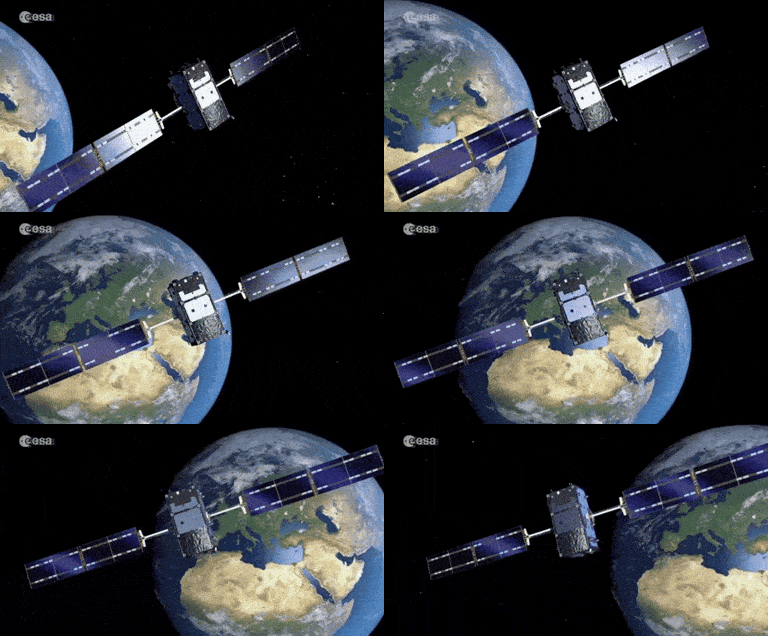
Google is exploring solar-powered satellites equipped with its AI chips to run workloads above Earth’s grid, tapping round-the-clock sunlight (claimed ~8× power availability) to sidestep data-center energy and siting limits. Its chips reportedly passed radiation tests simulating 5 years in space, with a two-satellite demo via Planet Labs, in place for 2027 to validate in-orbit hardware and operations.
If this works, Suncatcher creates an off-grid compute tier powered by uninterrupted solar, reducing dependence on local electricity, cooling, and permitting—though latency, bandwidth, and space-ops risk remain open questions.
This is a new addition to the AI space race. Space in space (?) is getting crowded fast. Orbits and radio bands are limited, space junk keeps piling up, and mega-constellations make traffic control tough while the rules lag behind. That opens the door for a few big players to lock down the best spots and spectrum, leaving smaller countries and startups squeezed. There are Earth-side issues too, such as launch emissions, reentry debris, and big questions about who gets to mine the Moon or asteroids.
It’s a bit “first come, first served” right now, and rings echoes of historical colonisation periods. Except this time we’re not colonising a country, but space? Strange times.
{{ First name | friend }}, thanks for reading.
If you found this useful, please reply and let me know what you enjoyed, and share this with a mate who you think could benefit from it. :)
Stay human,
Billy